Bridal shower invitation wording needs to make the celebration easy to understand before it makes the design look pretty. Name the person being celebrated, give the date and place, and tell guests exactly how to reply. A floral border can frame those details; it should not force the address into tiny type.
These original drafts use placeholders so you can adapt them without accidentally copying fictional contact details into your finished invitation.
Write the essential details in plain text
Collect the guest of honor’s preferred name, the event type, full date, start time, venue and address, host name, reply deadline and reply method. Add a time zone for an online event or when your guests may read the invitation in different zones.
Include a gift preference, registry link or special request only when it applies to this event. Decide those details with the host rather than inferring them from a decorative template.
Choose one of three invitation drafts
A relaxed garden gathering
An afternoon among the flowers
A bridal shower celebrating [Name]
[Day, Month Date, Year] at [Time]
[Venue] · [Full address]
Hosted with love by [Hosts]
Please reply to [Contact] by [Date]
Use the opening line as a small accent and give the person’s name the strongest position. Keep the location and reply instructions in simple lettering.
A brunch celebration
A seat at the table for a lovely celebration
Join us for a bridal brunch honoring [Name]
[Day, Month Date, Year] · [Start time]
[Restaurant or venue]
[Full address]
Hosted by [Hosts]
Let [Contact] know by [Reply date]
If guests are choosing a meal in advance, add the actual reply instructions in the message accompanying the invitation. Do not let a vague “RSVP” hide a practical task.
An online gathering
A little distance, a shared celebration
Please join an online bridal shower for [Name]
[Day, Month Date, Year]
[Time and time zone]
Hosted by [Hosts]
Reply via [Method] by [Date]
Joining details will be sent to confirmed guests
Only promise later joining details if the host has arranged how to send them. Keep private meeting links out of public Pinterest previews.
Arrange the words inside a floral border
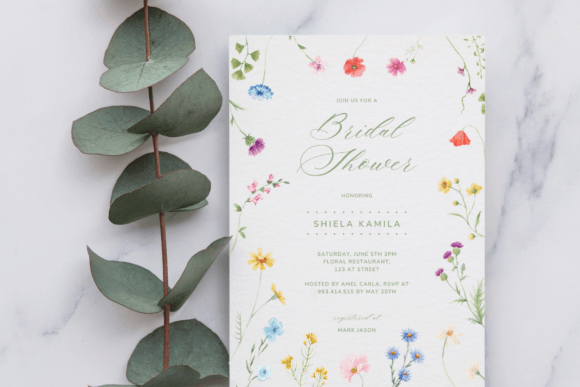
The Wildflower Bridal Shower Invitation below is listed as a 5 × 7 inch Canva template with editable text. Its colorful perimeter suits a clear center column. The listing describes changing text properties and adding images; it does not establish that every flower can be recolored separately.
Try four blocks: a short opening, the honoree’s name, date and venue, then the reply instructions. Leave a visible gap between the logistics and the RSVP line. If the address occupies three lines, shorten the decorative opening before shrinking the address.
For a longer name, widen its text box within the available center or use a less elaborate typeface. Our small-text guide offers a check for crowded details.
Make a separate text version for phones
An image invitation can become difficult to read in a chat preview. Accompany it with a plain-text message containing the same date, time, address and reply route. A URL drawn into a JPG is not a clickable link just because it looks like one.
For example: “You’re invited to [Name]’s bridal shower on [full date] at [time]. We’ll meet at [venue and address]. Please reply to [contact] by [date]. The invitation image has the same details.” Replace every bracket before sending.
Open your exported image on a phone and inspect it without zooming first. Then check the actual PDF if you are preparing a separate print version. Keep those two exports clearly named; their delivery requirements differ.
Do a final details pass
Read the date and reply deadline against a calendar, verify the address with the host, and test the reply route. Ask someone unfamiliar with the event to find the time, location and contact in one reading. A Canva template supplies a layout, not event management or automatic RSVP collection.
For matching favors, continue with a short wedding favor message. For the wider set, use our stationery checklist.
Files to explore for this project
Affiliate links: if you purchase through these links, we may earn a commission. How this works
Selected from the creators’ listing descriptions, checked October 22–23, 2026. We have not downloaded or hands-on tested these products. Product images below are previews from the creators’ listings. They may show physical styling props; the linked products are digital downloads. Check current access terms and the license on Creative Fabrica.
A garden-party invitation
Wildflower Bridal Shower Invitation
By Azhartpaper · Creative Fabrica
A colorful wildflower border around a portrait invitation, with a quiet center for the celebration details.
A 5 × 7 inch Canva template reached through a PDF link. The listing describes editable wording, type, text colors, sizes and placement, plus the option to add images.
File & software checks
Check any paid Canva elements and whether the floral border itself can be changed. Replace all sample contact information; a template does not collect RSVPs for you.
Keep the useful part. Make the rest your own.
How we prepare our digital guides